MQTT Broker Data Collector
The MQTT Data Collector leverages the power of MQTT, a lightweight messaging protocol ideal for the Internet of Things (IoT). With JEDI's built-in MQTT broker, you can seamlessly connect to a vast ecosystem of MQTT-enabled devices, sensors, and applications.
What is MQTT?
MQTT (Message Queue Telemetry Transport) is a standardized publish/subscribe protocol designed for low-bandwidth, high-latency networks. It's a popular choice in IoT applications due to its:
- Efficiency: Small message footprint ensures efficient data exchange over constrained networks.
- Scalability: MQTT brokers can handle large numbers of publishers and subscribers.
- Flexibility: The publish/subscribe model decouples data producers (publishers) from consumers (subscribers), enabling dynamic communication patterns.
Benefits of a Built-in MQTT Broker
- Simplified Setup: No need to install and manage a separate MQTT broker. JEDI takes care of everything for you.
- Reduced Costs: Eliminates the need for additional cloud-based MQTT services, potentially saving you money.
- Enhanced Security: Keep your data on-premises and under your control, especially important for sensitive industrial or enterprise applications.
Configuration
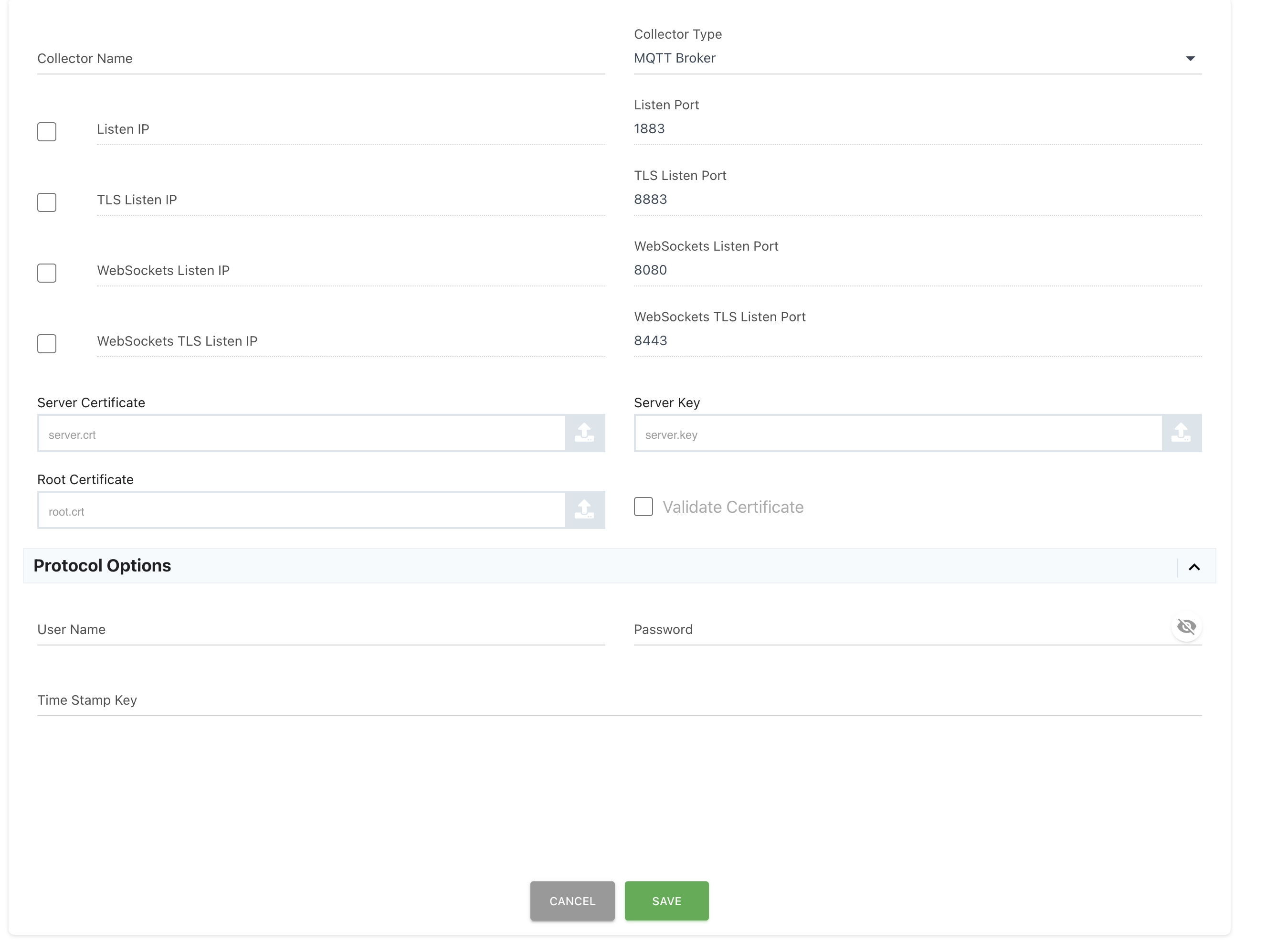
-
Enable the MQTT Broker:
-
Navigate to
Settings->Data Collectors. - Click the
ADD CONNECTORbutton to add a new collector. -
Select "MQTT Broker" as the
Collector Type. -
Advanced Configuration Options:
-
Listen IP: The IP address that the MQTT broker listens on. Leave blank to listen on all interfaces.
- Ports: JEDI's MQTT broker offers independent port configuration for secure and non-secure connections using both TCP and WebSockets protocols. You can specify ports for the following combinations:
- TCP Port: Port for standard MQTT connections (default: 1883).
- TLS Port: Port for secure MQTT connections with TLS encryption (optional).
- WebSocket Port: Port for MQTT connections over WebSockets (optional).
-
WebSocket TLS Port: Port for secure MQTT connections over WebSockets with TLS encryption (optional).
-
TLS Configuration: Enable TLS for secure communication and provide the following certificates (if using TLS):
- Server Certificate: The PEM-encoded server certificate file.
- Server Key: The PEM-encoded server private key file.
- Root Certificate: The PEM-encoded certificate of the Certificate Authority (CA) that signed the server certificate (optional).
- Verify Client Certificate: Enable this option to require client certificates for authentication (optional).
- Authentication: Optionally configure username/password authentication for added security.
- Timestamp Key: Specify a field name within the payload JSON that contains a Unix timestamp (in nanoseconds) for data point timestamps.
Generating Server Certificates
While JEDI can operate with self-signed certificates for testing purposes, it's recommended to use certificates signed by a trusted Certificate Authority (CA) for production deployments. There are various methods to obtain server certificates, including purchasing them from a commercial CA or generating your own using tools like OpenSSL. Refer to the documentation for your chosen method for certificate generation.
Protocol Options
Username/Password: Enable this option and configure usernames and passwords for client authentication. Clients will need to provide valid credentials to connect to the MQTT broker.
Data Payload Format
JEDI requires data to be sent in JSON format. Here's an example:
Unique Data Source Identification
JEDI uses the MQTT client ID as the device's unique identifier and extracts metric names from the JSON payload. For example, in the sample above, JEDI would create data sources named:
- sensor_temperature
- device_battery_voltage
- machine_status
Client-Side Considerations
MQTT clients (publishers) can freely choose topics to publish data on. Ensure your MQTT client libraries support JSON payloads.
Example: Publishing Data with an MQTT Client
Many MQTT client libraries are available for various programming languages. Here's a simplified example using Python's paho-mqtt library:
import paho.mqtt.client as mqtt

# Configure your MQTT broker address, topic, and payload
broker_address = "<broker_ip>"
topic = "sensor/temperature"
payload = 25.5  # Temperature value as a float

def on_connect(client, userdata, flags, rc):
    if rc == 0:
        print("Connected to MQTT Broker!")
        client.publish(topic, payload)
    else:
        print("Connection Error:", rc)

client = mqtt.Client()
client.on_connect = on_connect

client.connect(broker_address)
client.loop_forever()
Unlock the Power of MQTT with JEDI!
The built-in MQTT Data Collector simplifies data collection from a vast range of MQTT-enabled devices. Get started today and harness the power of MQTT in your Machinechat JEDI deployments!
Need help? Contact our support team: support@machinechat.io